Ulysse Speedometer Pro
- 3.4
- Rating
- 100.00K
- Installs
- $1.99
- Price
 Analysis by App-foxy
Driving with a speedometer that is easy to read can make a bigger difference than people expect. That is the narrow job I focused on while testing Ulysse Speedometer Pro: turning a phone into a dedicated-looking speed display for everyday travel. It is an Auto & Vehicles app from binarytoys, and its appeal is straightforward rather than flashy. You open it, place the phone where you can glance at it safely, and use the screen as an additional indication of your current speed.
I like that the app does not try to become a complete driving companion in my experience. Its store summary says “Drive safely!”, but the useful question is what that means behind the wheel. For me, the value is not replacing the car’s built-in instruments. It is having a large, phone-based reference when the original display is difficult to see, when I am riding as a passenger, or when I want a simple speed readout for a bicycle or another vehicle. That focused purpose also explains its limitations.
One clear capability: a phone-based speed display
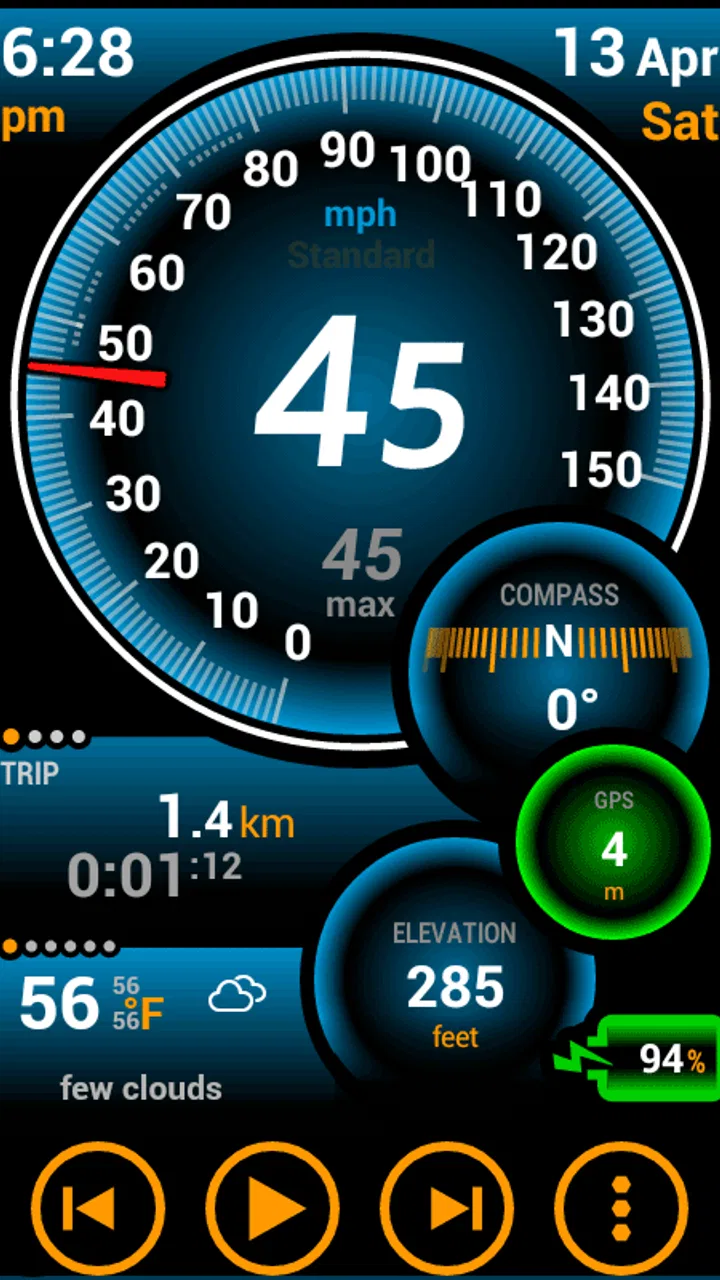
The central capability is a GPS speedometer. The app’s short store description is simply “Ulysse Speedometer,” and that plain wording is a fair description of the experience: this is primarily a speed-reading tool, not a navigation service or a full trip-management platform. I found the uncluttered idea useful because it keeps attention on one piece of information instead of surrounding it with maps, messages, fuel tools, or route planning.
You May Also Like

 Google Keep - Notes and lists
Google Keep’s Quiet Growth Shows the Appeal of Simpler Notes
As mobile work gets busier, Google Keep keeps winning a simple contest: capture a thought quickly, find it later, and get on with the day.

 Blood Strike: 2.5 Anniversary
Blood Strike’s Loadouts Turn Every Drop Into a Tactical Gamble
A close look at Blood Strike’s custom loadouts: how fast access to signature weapons reshapes its battle royale rhythm, rewards preparation, and narrows the gap between fights.

 Pandora - Music & Podcasts
Pandora’s Music Is Easy to Start, but Harder to Recover
Pandora’s strength is its low-effort path from a seed to a station. Its weak spot is how much confidence it asks you to place in connection, setup, and quiet recovery.

 8 Ball Pool
 Is Built on Rivalries, Rematches, and Routine
A close look at the rivalries, rematches, shared routines, and unanswered safety questions that turn a quick pool match into a persistent mobile community.

 Samsung Music
’s Quiet Strength Is Playing What You Already Own
Its reach comes less from spectacle than from dependable access to a personal library. That simplicity is both the app’s strongest retention engine and its ceiling.

 AccuWeather: Weather Radar
AccuWeather Review: A Quick, Clear Forecast for Everyday Decisions
For everyday plans, the best forecast is the one you can understand quickly. AccuWeather makes rain timing, radar, and local conditions easy to act on, with a few trade-offs.
More From Our News Desk



That focus matters when the phone is mounted low, placed on a dashboard, or held by a passenger. A large speed readout is easier to understand at a glance than a crowded screen. I would still treat the vehicle’s own speedometer as the main reference whenever it is available. The phone is an extra instrument, and safe use depends on mounting it securely and checking it without taking attention away from traffic.
The app is rated for Everyone, which fits its simple subject matter. It costs $1.99, so the decision is less about tolerating an advertising-heavy free tool and more about whether a dedicated speed display is worth paying for. The application has been available since May 12, 2011, and binarytoys has kept it visible in a category where many people may otherwise use a free navigation app or the dashboard itself.
Its current average is 3.4 from around 4.8 thousand ratings, with roughly 914 written reviews and over 100 thousand installs. I read those figures as a sign that the app has found a specific audience, but not as proof that it will suit every phone or vehicle. A speedometer depends on location reception, phone placement, screen visibility, and the way each person uses it. Those practical details matter more here than a popularity figure.
Why a dedicated display can be useful
Most navigation applications can show speed somewhere, but speed is usually secondary to the map. That creates a different kind of screen: useful for directions, yet often busy when all I want is a quick indication of pace. Ulysse Speedometer Pro makes more sense when the speed number itself is the reason for opening the app.
A dedicated display is also more flexible than the fixed instrument panel in one important way: I can move the phone between vehicles. A passenger can use it during a coach trip, a cyclist can use it on a suitable mount, and someone testing a vehicle can compare the phone’s reading with the dashboard. These are not replacements for proper equipment, but they are practical situations in which a second reference has a purpose.
The trade-off is that the phone introduces its own variables. GPS-based readings can react differently when reception is weak, when the vehicle is moving slowly, or when the device has not yet settled on a location. I would not use a phone speedometer to make precise legal or mechanical judgments. I would use it as a convenient visual aid and keep a sensible margin rather than treating the number as an absolute measurement.
How it feels in ordinary use
My preferred workflow is simple. Before moving, I launch the app, wait for the phone to establish its position, place it in a stable holder, and set the screen where it can be seen with a brief glance. I avoid handling the device once the journey begins. This preparation is more important than it sounds: a speedometer that is technically available but poorly positioned can become a distraction instead of a help.
The best result comes from treating the app like an instrument, not like something to interact with while driving. I do not need to keep tapping around to obtain value from it. Once the display is visible, the useful action is simply reading it. That makes the app a better fit for a prepared setup than for someone who expects extensive controls, route guidance, or constant customization.
For a realistic everyday example, imagine borrowing a car whose dashboard is partly obscured by the steering wheel or difficult to read in bright light. I would place the phone in a legal, secure position before leaving, start the speedometer, and use it as a secondary glance point on an unfamiliar road. If the phone loses reception or the number behaves strangely, I would ignore it and rely on the vehicle’s own instruments. The app helps in that situation because it is available quickly, but it does not remove the need for judgment.
Another useful workflow is a passenger-led check during a long trip. The passenger can position the phone and watch the reading while the driver concentrates on the road. This is particularly sensible when the driver wants to compare the dashboard’s indication with a separate GPS-based reference without touching the phone. It turns the app into a low-effort observation tool rather than another source of driver workload.
What affects the reading
Speed readings from a phone are most dependable when the device has a clear view of the sky and the vehicle is moving steadily. Tall buildings, tunnels, covered roads, and abrupt changes can make any location-based estimate less stable. That is not a flaw unique to this application, but it is a limitation users should understand before depending on it.
At very low speeds, the reading may be less useful than it appears because small changes in location over a short period are harder for a phone to interpret consistently. In stop-and-go traffic, I would pay attention to the general indication rather than reacting to every small change. On a steady road, the display becomes more useful as a broad reference.
Screen placement also changes the experience. A phone lying flat can create glare, while a device positioned too close to the driver can obstruct visibility. I prefer a mount that keeps the display within a quick glance but outside the main view through the windshield. Brightness, battery use, and heat are practical concerns during long journeys, so I would prepare the phone before starting rather than adjusting it on the move.
One non-obvious benefit of a focused app is that it can reduce the temptation to browse. A navigation application may invite route changes, destination searches, and notifications. A speedometer has a much narrower purpose. That does not make it automatically safe, but it can support a cleaner setup when the phone is already mounted and the driver has decided to use it only as a secondary display.
The situation where I would recommend it first
The strongest use case is a vehicle with a difficult-to-read dashboard, provided the phone can be mounted safely. This might be an older car, a borrowed vehicle, or a seating position where the steering wheel blocks part of the instrument cluster. In that setting, a large phone display can be more convenient than opening a full navigation app and waiting for a map interface to load.
I also see value for people who want a simple speed reference on a bicycle or similar ride, assuming the device is mounted securely and local rules allow that setup. The app’s category is Auto & Vehicles, so I would not mistake it for a specialist cycling computer. Still, the focused display can be useful for a casual rider who wants speed information without buying separate hardware.
It can also help during a passenger’s road observation. A passenger may want to monitor speed while the driver focuses on traffic, or someone may be checking how a dashboard compares with a phone-based reading. In both cases, the app’s strength is its narrow output. There is less to interpret than in a general-purpose navigation screen.
For a learner or newly licensed driver, however, I would frame it carefully. The app should not become a target that encourages watching numbers instead of reading the road. A driver should follow posted limits, road conditions, and the vehicle’s normal instruments. The phone can offer context, but it cannot replace training or responsible attention.
There is a useful comparison with the usual alternatives. The built-in dashboard wins for immediate availability, integration, and safety because it is designed as part of the vehicle. A navigation app wins when directions, traffic, and route planning are needed at the same time. A dedicated hardware GPS unit or cycling computer may win for long-term accuracy, mounting, battery endurance, and purpose-built controls. Ulysse Speedometer Pro sits between those choices: more portable than built-in equipment and simpler than navigation software, but less integrated than the dashboard and less specialized than dedicated hardware.
When the simple approach is better than a full navigation app
I would choose this app over a navigation alternative when I already know the route and do not want a map competing for attention. It is especially sensible for a short trip where the only question is whether the phone can provide a readable speed indication. Paying for a focused tool can be reasonable if I use that setup regularly and prefer not to deal with the extra controls of a larger app.
I would choose navigation software instead when I need turn-by-turn guidance, traffic information, destination search, or a broader trip overview. A speedometer cannot compensate for those missing functions. Likewise, I would choose the vehicle’s own display whenever it is clear and trustworthy, since adding a phone then creates extra setup without solving a real problem.
Trade-offs I noticed before relying on it
The biggest trade-off is confidence. A phone speed reading feels precise because it presents a number, but the display should not encourage false certainty. GPS conditions, movement, and device behavior can all influence what appears on screen. My practical rule is to use the reading as an additional indication and leave a safety margin, never as a reason to drive close to a limit.
The second trade-off is setup. The app itself may be simple, but safe use requires decisions about the holder, viewing angle, charging, and starting the reading before departure. Someone expecting an instant, hands-free replacement for a dashboard may be disappointed. In my experience, the app works best when the physical arrangement is handled first and the software is left alone afterward.
There is also a visibility trade-off. A phone screen can be bright and readable, yet reflections or sunlight can make it harder to see at exactly the wrong moment. I would test the position while parked at different times of day. If the number requires squinting or leaning forward, the setup is not good enough, regardless of how useful the application seems in theory.
For long journeys, the phone becomes part of the vehicle’s power and heat equation. Keeping a screen active can consume battery, and a device in direct sunlight may become uncomfortable to handle. I would start with a charged phone, use suitable ventilation, and avoid placing it where heat builds up. These are everyday precautions, but they determine whether a speedometer app remains convenient after the novelty wears off.
The rating of 3.4 suggests a mixed experience among users, and I think that is understandable for a tool affected by different phones, vehicles, mounts, and expectations. Someone wanting a clean speed readout may find the concept worthwhile, while someone expecting a complete driving dashboard may consider it too limited. The price makes that distinction important: I would buy it for the focused use case, not for features it was never meant to provide.
Questions I would settle before installing
Would I use it as my only speedometer? No. I would keep the car’s own instrument as the primary reference and use the phone as a secondary display. That approach respects the difference between a convenience app and equipment designed into the vehicle.
Does it make sense without a phone mount? Usually not for the driver. A loose phone is unsafe and difficult to read consistently. The app is more appropriate when the device can be secured in a position that does not block visibility or require handling during travel. A passenger can use it more flexibly, but the driver should still avoid interaction while moving.
Is it a replacement for navigation? No. It is better understood as a focused speed tool. If the trip depends on directions or traffic information, a navigation app is the better choice. Installing both can make sense only when the phone setup supports safe viewing and the user genuinely needs both functions.
Could it help with a speedometer that seems inaccurate? It can provide a comparison, but I would not treat a single phone reading as a formal calibration. If there is a serious discrepancy, the right response is to have the vehicle checked or consult reliable equipment. The app can raise a question; it should not be the final authority.
Is the $1.99 purchase worthwhile? For occasional curiosity, probably not if the vehicle already has a clear speedometer. For a repeatable setup in a borrowed car, an older vehicle, or a casual riding situation, the low one-time cost may be easier to justify than a larger navigation package or separate device. My recommendation depends on whether the focused display solves a real problem in your routine.
Who gets the most from this focused tool
I think the best audience is someone who wants a portable, uncomplicated speed reference and already understands its boundaries. That includes drivers with awkward dashboard visibility, passengers who want to observe speed, and casual riders who can mount a phone safely. The app’s Everyone rating makes its subject approachable, but safe driving habits still matter more than the simplicity of the interface.
I would skip it if I mainly want maps, traffic, trip history, vehicle diagnostics, or a polished all-in-one dashboard. I would also skip it if I have no safe place to mount the phone or if the built-in speedometer already does everything I need. In those situations, the app adds another screen without adding enough value.
After using it, my opinion is positive but deliberately narrow. Its real strength is turning a spare phone screen into a readable secondary speed reference without asking it to become an entire driving system. That is useful when the situation calls for it, yet it is not a reason to ignore the dashboard, road conditions, or safe mounting.
Ulysse Speedometer Pro from binarytoys is therefore easiest to recommend to a specific person rather than everyone: someone with a clear, recurring need for a simple speed display. If that describes you, the focused design and $1.99 price make it worth considering. If you want navigation or professional-grade vehicle instrumentation, another option will serve you better. I would install it for the former use case, prepare the phone before moving, and treat every reading as helpful context rather than permission to take risks.
FAQs for Ulysse Speedometer Pro
01What is Ulysse Speedometer Pro used for?
Ulysse Speedometer Pro is a GPS-based speedometer and trip-monitoring app designed for drivers, cyclists, motorcyclists, and travelers. After testing its main features, we found that it can display current speed, trip distance, travel time, and other useful journey information. It is especially helpful when you want a clearer dashboard than the one provided by your vehicle or when traveling in an unfamiliar car.
02Does Ulysse Speedometer Pro work without a mobile data connection?
The app primarily relies on your device’s GPS receiver, so basic speed and trip tracking can generally work without an active mobile data connection, provided the phone has a clear view of the sky and location services are enabled. However, features that depend on online maps, traffic information, weather data, or other connected services may require internet access. GPS accuracy can also vary indoors, in tunnels, or between tall buildings.
03How accurate is the speed shown by Ulysse Speedometer Pro?
Ulysse Speedometer Pro can provide a useful speed estimate by reading GPS movement, but it should not be treated as a certified replacement for a vehicle’s speedometer or official measuring equipment. Accuracy depends on GPS signal quality, the phone’s hardware, road conditions, and how quickly your speed changes. Before relying on the display, allow the app time to obtain a stable location signal and keep the device positioned safely.
04What permissions does Ulysse Speedometer Pro need?
The most important permission is access to your device’s location, since GPS information is required to calculate speed, distance, and route-related data. Depending on the version and the features you activate, the app may also request permission to send notifications or remain active while the screen is locked. It is worth reviewing these permissions during setup and disabling anything unnecessary, while remembering that restricting location access can affect tracking performance.
05Is Ulysse Speedometer Pro suitable for everyday driving?
Ulysse Speedometer Pro can be useful for everyday driving, road trips, cycling, and motorcycle journeys when you want a large, easily visible speed display and additional trip information. Nevertheless, it should be used responsibly: configure the app before starting, mount the phone securely, avoid handling it while moving, and obey local traffic regulations. The Pro version may also offer a more complete experience by reducing limitations found in a basic edition.
Pros
- Large
- easy-to-read speed display is clear while driving.
- Supports multiple speed units for use in different countries.
- Speed limit alerts can help encourage safer driving habits.
- Works well for cycling
- walking
- and other outdoor activities.
- Simple interface makes the app quick to start and use.
Cons
- GPS accuracy can vary in tunnels
- cities
- or areas with weak signals.
- Continuous GPS use may noticeably reduce your phone’s battery life.
- Some advanced features may require payment or an upgrade.
- The app may not replace a vehicle’s legally certified speedometer.
- Background operation can be affected by phone battery-saving settings.

Ulysse Speedometer Pro
Gallery